Connecting PHP to MySQL is not just a technical step—it is the basic part of how data-driven websites work. From logging into accounts to browsing product catalogs, every interaction works on a database storing and retrieving information. PHP takes care of the logic, while MySQL stores the data securely. Without this connection, websites would be static, and their ability to handle user data would disappear.
MySQL is a database system that organizes information into tables for easy access and modification. When combined with PHP, it enables you to create websites that do more than just show material; they become dynamic and interactive based on user demands.
In the following sections, you will learn how to establish this relationship and why it is critical for developing functioning, user-focused apps.
How to Connect PHP to MySQL?
There are two ways to achieve that – MySQL extension and PDO (PHP Data Objects). Each comes with its strengths and knowing this will help you to know what best fits your project.
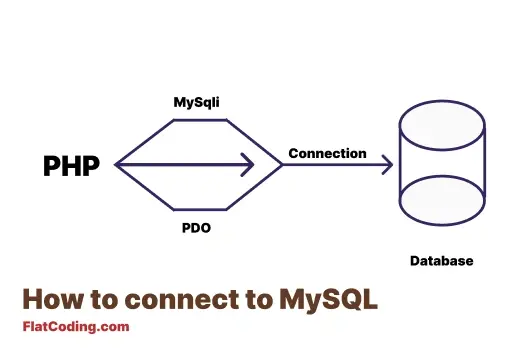
Connect PHP with MySQL using the MySQLi Extension
The mysqli stands for MySQL Improved, and it is designed specifically to work with MySQL databases. This way works well if MySQL is the only database you plan to use.
This is a simple example of the MySQLi extension:
$host = "localhost";
$username = "root";
$password = "";
$database = "example_db";

// Create a connection
$conn = new mysqli($host, $username, $password, $database);

// Check for errors
if ($conn->connect_error) {
    die("Connection failed: " . $conn->connect_error);
}

echo "Connected successfully!";
You can use either object-oriented or procedural code in MySQLi.
Connect PHP with MySQL using PDO (PHP Data Objects)
In PDO we can access the database connections which also support not just MySQL but other databases like PostgreSQL and SQLite. If you use multiple types of databases.
Here is an example of connecting PHP with a database using PDO:
$dsn = "mysql:host=localhost;dbname=example_db";
$user = "root";
$password = "";

try {
    $pdo = new PDO($dsn, $user, $password);
    $pdo->setAttribute(PDO::ATTR_ERRMODE, PDO::ERRMODE_EXCEPTION);

    echo "Connection successful!";
} catch (PDOException $e) {
    echo "Connection failed: " . $e->getMessage();
}
So, if you plan to use PDO, you will work with object-oriented style only, and it comes with advanced features like error handling and support for prepared statements.
To choose between MySQLi and PDO, think about what your project needs. This is a simple comparison between both:
| Feature | mysqli | PDO |
|---|---|---|
| Database Support | MySQL only | Multiple databases |
| Syntax | Object-oriented & procedural | Object-oriented only |
| Prepared Statements | Supported | Supported |
| Error Handling | Basic | Advanced |
| Transactions | Supported | Supported |
So, which one should you use?
- Pick
MySQLiif you are working with MySQL and want something quick. - Choose PDO if you need to work with other database types or prefer more advanced features for error handling and transactions.
Both methods get the job done, so it comes down to what fits your specific needs.
Let’s see an example of a centralized script for database connection in the following section.
Creating a Database Connection Script
Writing the database connection code repeatedly in multiple files is not a good idea. Mistakes can creep in, and updating your credentials or logic becomes more complicated. Instead, creating a centralized script for reusable connections is a positive choice.
Here is a basic script that you can include in any PHP file to establish a connection.
db_connection.php
function connectToDatabase() {
    $host = "localhost";
    $username = "root";
    $password = "";
    $database = "example_db";

    // Create connection
    $conn = new mysqli($host, $username, $password, $database);

    // Check for connection errors
    if ($conn->connect_error) {
        die("Connection failed: " . $conn->connect_error);
    }

    return $conn;
}
You have to include this script in any file where a database connection is needed. Here is an example:
include 'db_connection.php';

$conn = connectToDatabase();

// Example query
$sql = "SELECT * FROM users";
$result = $conn->query($sql);

if ($result->num_rows > 0) {
    while ($row = $result->fetch_assoc()) {
        echo "User: " . $row["username"] . "<br>";
    }
}

// Close the connection
$conn->close();
So here, if you call the connectToDatabase() function, you ensure consistent handling of every connection without duplicating code.
Also, remember that closing a MySQLi connection is required. So you should do that in the following cases:
- After Completing Database Operations: As soon as you are done querying or updating the database, close the connection
- In Long Scripts: For scripts that perform multiple operations, close the connection as soon as a specific task is completed, especially if the same script needs to reopen a connection later.
- Before Script Ends: Closing the connection shows intent and ensures no lingering connections remain open.
Wrapping Up
PHP works with MySQL to help us store, retrieve, and manage data. Here is a quick recap:
mysqliis simple, easy to use, and perfect for MySQL-specific projects.- PDO allows you to work with multiple database systems and has advanced features for error handling and transactions.
Both options give you the tools to build functional and interactive web applications. Your choice depends on what your project requires.
Similar Reads
Echo and print are foundational in displaying output in PHP, and though they might be similar in some ways, they…
PHP has great tools to handle external files such as opening, writing, deleting and more else, in this tutorial we…
The filter_var_array() appeared to make input validation simple and sanitization in PHP. It handles multiple inputs with different filters was…
If you want to write good PHP code, strict mode should be on your radar. Strict mode—activated by the command declare(strict_types=1); at…
The PHP switch statement is multiple conditions to only execute one block if its condition generating a true boolean value.…
The function_exists() function in PHP checks whether a given function is defined or not. The function_exists() function works for both…
Developers use the array_count_values function in PHP to find how many times each value appears in an array. What is…
A destructor in a PHP class runs when an object is no longer needed. It frees resources and cleans up…
The array_pop function in PHP gives you a direct way to take the last element from an array. Understand the…
The PHP do-while loop is a type of loop that executes a block of code at least once, and then…