

Table of Content
The PHP do-while loop is a type of loop that executes a block of code at least once, and then repeatedly executes that block of code as long as the specified condition remains true. In this article, we’ll explore the syntax and functionality of the do-while loop in PHP, and provide some examples of how it can be used in practice.
The Syntax of the PHP do-while Loop
The do-while loop in PHP has the following syntax:
<?php

  do {
     // code to be executed
  } while( express )

?>
In this syntax, the code block within the curly braces will always be executed at least once. Regardless of whether the condition specified in the while statement is true or false. After the code block has been executed. The condition is checked, and if it evaluates to true, the code block is executed again. The loop will keep running until the condition is no longer true.
The main difference between the do-while loop and the while loop is that the while loop checks the condition before the code block is executed, while the do-while loop, The condition is checked once the code block has been executed. This means that the code block within the do-while loop is guaranteed to be executed at least once.
Understanding the Functionality of PHP’s Do-While Loop
In PHP, statements are executed line by line. The do-while loop in PHP consists of two parts: the statement block and the condition block.
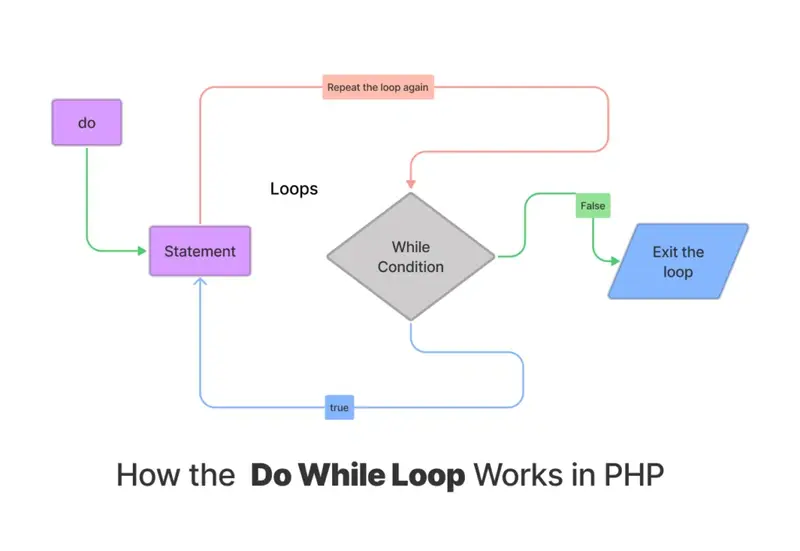
The statement block is executed first by the PHP interpreter, followed by the condition block. If the condition evaluates to true, the loop is executed again, and if it evaluates to false, the loop terminates.
To illustrate this concept further, let’s take a look at some examples in the following section.
Example 1: Using the do-while Loop to Print a Series of Numbers
Let’s start with a simple example that demonstrates how the do-while loop can be used to print a series of numbers. In this example, we’ll use a do-while loop to print the numbers 1 through 10:
<?php

   $num = 1;
   do {
    echo $num . " ";
    $num++;
   } while ($num <= 10);


?>
In this example, we first initialize the variable $num to 1. We then enter the do-while loop, which prints the value of $num using the echo statement, increments the value of $num by 1 using the $num++ statement, and then checks whether $num is less than or equal to 10 using the while statement. If $num is less than or equal to 10, the loop executes again, printing the next value of $num. This process continues until $num is greater than 10, at which point the loop terminates.
Example 2: Using the do-while Loop to Validate User Input
Another common use case for the do-while loop is to validate user input. In this example, we’ll use a do-while loop to ask the user to enter a positive integer, and continue asking until a valid input is provided:
<?php

   do {
      $input = readline("Enter a positive integer: ");
   } while (!is_numeric($input) || $input < 1 || strpos($input, '.') !== false);

   echo "You entered: " . $input;


?>
In this example, we use the readline() function to prompt the user to enter a positive integer. We then enter the do-while loop, which checks whether the input provided by the user is numeric, greater than or equal to 1, and does not contain a decimal point (using the is_numeric(), $input < 1, and strpos() functions, respectively). If any of these conditions are not met, the loop executes again, prompting the user to enter a valid input. This process continues until a valid input is provided, at which point the loop terminates and the input is displayed to the user.
Wrapping Up
In PHP, the do-while loop has two parts: the statement block and the condition block. The PHP interpreter executes the statement block first, followed by the condition block. If the condition is true, the loop continues executing. However, if it is false, the loop terminates.
Similar Reads
There are situations where you only need a specific number of rows returned. This is where the "LIMIT" clause in…
In PHP, string operators, such as the concatenation operator (.) and its assignment variant (.=), are employed for manipulating and…
Perhaps you're new to PHP or sharpening your skills and looking to understand how numbers work within this language under…
Before the spread operator, PHP developers had to pass array items to a function using extra steps. They often had…
Sometimes, when you run a script, you may encounter an error because the directory you're trying to access doesn't exist.…
If you're coding in PHP you've most probably come across the terms 'parameters' and 'arguments' in functions. Well, they are…
actions, store settings, or even create log files for debugging. That’s where PHP fwrite comes in. It writes data to…
PHP Variadic functions show you a way to handle a variable number of arguments within a function. They are designed…
You can use array_filter in PHP to remove unwanted data from arrays. It works with a custom callback or default…
The PHP $_GET— is a tiny part, but strong in the data processing using the URL. There is a site that…