The breadcrumb in HTML shows a path through a site and marks the place of a page inside it. It links back to higher pages and lets a user move between sections without guesswork.
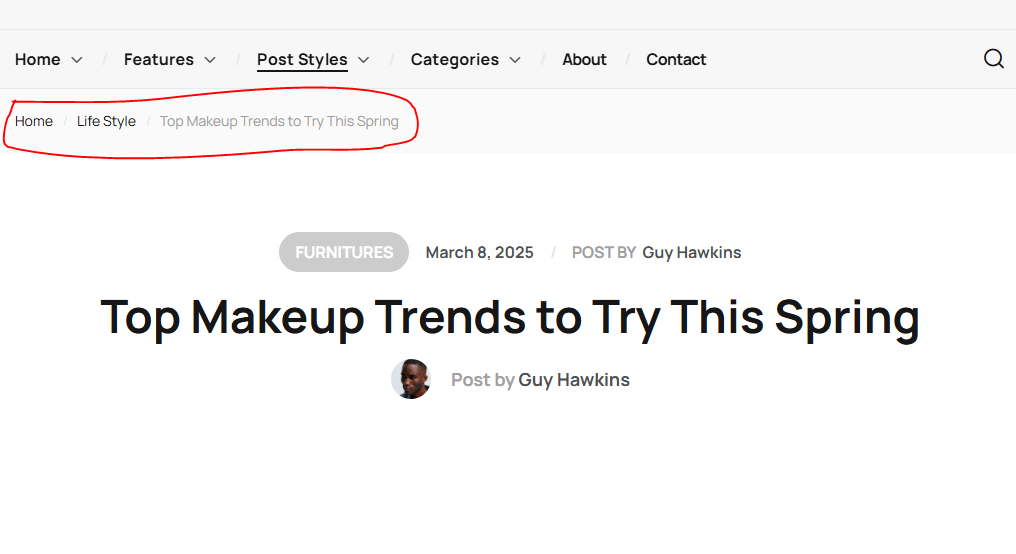
Here is an example of where you can place breadcrumbs in a single article page:
It also gives search engines a clear path of the site. This makes it a key part of good site structure for smart beginners who want to build easy paths in HTML.
What is an HTML Breadcrumb?
An HTML breadcrumb shows a user’s path inside a site and tells where the page stands in the site order. It also gives links back to higher pages and helps a user move around without guesswork.
Here is an example:
<nav aria-label="breadcrumb">
  <ol>
    <li><a href="/">Home</a></li>
    <li><a href="/shop">Shop</a></li>
    <li>Shirts</li>
  </ol>
</nav>
This shows the user stands in the Shirts page under Shop and can go back to Home or Shop. It also helps search engines read the site structure.

Types of Breadcrumb Navigation in HTML
Three main types exist in practice, and each one has a unique path style.
Location-based breadcrumb:
This type shows the page position in the site and fits sites with deep folder paths.
Home > Products > Phones > Model A
The user sees each folder step and can jump to any step.
Path-based breadcrumb:
This type shows each step the user took and fits a site that allows many ways to reach one page.
Home > Deals > Electronics > Model A
The user returns to any earlier step in that path.
Attribute-based breadcrumb:
This type shows filters or tags on a product page and fits shops with many product traits.
Home > Shoes > Size 10 > Black
The user drops any filter with one click.
Wrapping Up
You learned what an HTML breadcrumb is and how it works, and you also learned the main types with code samples for each one.
Here is a quick recap:
- A breadcrumb shows the path of a page inside a site.
- Location type shows folder steps.
- Path type shows the way the user came.
- Attribute type shows active filters or tags.
FAQs
What is HTML breadcrumb navigation?
<nav>element for structure<ol>or<ul>for the path<a>links for clickable steps
How do I create a simple HTML breadcrumb?
<nav aria-label="breadcrumb">
  <ol>
    <li><a href="index.html">Home</a></li>
    <li><a href="blog.html">Blog</a></li>
    <li>Article</li>
  </ol>
</nav>
Why is HTML breadcrumb important for SEO?
- Search engines understand site structure
- Users can move back with fewer clicks
- Breadcrumb links appear in search results
What are the types of breadcrumb navigation?
- Location-based: shows position in site hierarchy
- Attribute-based: shows categories or filters
- History-based: shows path user followed
Similar Reads
HTML has three main list tags: <ul>, <ol>, and <dl>. Each one shows a different kind of group. In this…
The HTML section tag groups parts of a web page that share one theme. It gives clear meaning to content.…
The address tag in HTML shows contact details. The <address> tag helps show who owns the page or article. Understand…
The HTML <var> tag marks a word or phrase as a variable in a document. Web authors use it to…
The style tag in HTML defines CSS inside a web page. Click to see how it works with syntax and…
You use the HTML <table> tag to display structured data in rows and columns, using table elements such as <tr>…
The HTML textarea tag gives users space to enter longer messages. This element helps build forms that accept feedback, comments,…
The <details> tag hides content and shows it when needed. It helps organize long pages. The tag shows extra info…
HTML form validation attributes help you check the form data before it reaches the server. What Are HTML Form Validation…
The HTML canvas tag draws shapes and images. It also helps you draw text with code. It gives control over…