Table of Content
Mocha is a JavaScript test framework for Node.js. It runs tests in sequence and shows results. It works with any assertion library and supports asynchronous tests.
Benefits of Mocha Framework for JavaScript Testing
Mocha helps you run JavaScript tests with control and order. It works with any assertion library, so you can pick the one you want.
Let’s look at an example to understand it:
const assert = require('assert');

describe('Math tests', function() {
  it('adds numbers', function() {
    assert.strictEqual(2 + 3, 5);
  });
});
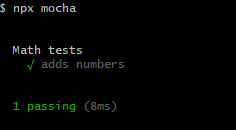
This test checks if 2 + 3 equals 5.
Here is the output in the terminal:
Install and Set Up the Mocha Framework to Test in JavaScript
Install Mocha with npm. Run this command in your project folder.
npm install --save-dev mochaAdd a test script package.json after installation in the same root of your code.
"scripts": {
  "test": "mocha"
}
Mocha with Assertion Libraries (Chai Example)
Create a file named test.js. Write a test inside it.
const assert = require('assert');

describe('Array', function() {
  it('returns -1 if value not found', function() {
    assert.strictEqual([1, 2, 3].indexOf(4), -1);
  });
});
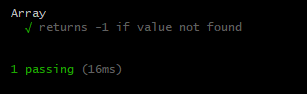
This test checks if indexOf(4) gives -1 for an array with numbers 1, 2, 3. Here is an image that shows you the result:
Run Test with the CLI of the Mocha Framework in JavaScript
Mocha works well with Chai. Chai gives different styles for writing assertions.
Install Chai with npm.
npm install chai --save-devHere’s how it works in practice.
const chai = require('chai');
const expect = chai.expect;

describe('Chai test', function() {
  it('checks type of value', function() {
    expect('hello').to.be.a('string');
  });
});
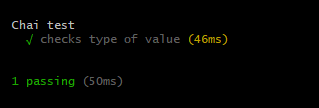
This test checks if 'hello' is a string.
Run tests with the Mocha CLI. Use the command below.
npx mochaThe command finds test files and runs them. It shows the results in your terminal.
Here is the result:
Organize Tests in Projects
Keep tests in a folder named test in your project. Mocha looks inside this folder by default. Place each test file inside it.
Use names that describe the test purpose.
Wrapping Up
You learned the role of Mocha and how to install it. Also, you understood how to write a test and how to run it.
Here is a quick recap:
- Mocha runs JavaScript tests with sequence and control.
- It works with assertion libraries like Chai.
- It runs tests from the CLI with
npx mocha. - It supports the test organization inside a
testfolder.
FAQs
What is Mocha JavaScript Test Framework?
How do I install Mocha JavaScript Test Framework?
npm install --save-dev mocha- Install globally:
npm install -g mocha - Install locally:
npm install --save-dev mocha
How do I write my first Mocha test?
const assert = require('assert');
describe('Array', function() {
  it('should return -1 when value is not present', function() {
    assert.equal([1,2,3].indexOf(4), -1);
  });
});
- Create test file:
test.js - Run test:
npx mocha
How to run Mocha tests from command line?
- Run all tests:
npx mocha - Run specific file:
npx mocha test/test.js
Similar Reads
Math.atan() function in JavaScript helps you to solve math problems in your code. It turns a number into an angle.…
The this keyword links code, context, and object reference in JavaScript. You can use it to refer to the owner…
You use loops in JavaScript to repeat code without copying it many times. This helps when you handle lots of…
Some numbers come from user input and other come from math operations. Sometimes, these numbers need to stay positive. The…
JavaScript Symbol Type gives a way to make unique values. A Symbol never matches any other value and this helps…
You will face hoisting early when you write JavaScript. It affects how your code runs, and it may confuse you…
The for...of loop appeared to solve the problem of complex loops over arrays and strings. It gives you a way…
JavaScript optional chaining lets you access object values without runtime errors. It checks if a property exists before access and…
Bitwise operators work with binary data at the bit level in JavaScript. They process numbers in binary form and return…
Object References in JavaScript mean that variables do not store full objects but only their references in memory. What is…