PHP has great tools to handle external files such as opening, writing, deleting and more else, in this tutorial we will focus more in “fopen” function.
Let’s see how the ‘fopen’ function works in PHP and see some practical examples.
The PHP fopen Syntax
PHP fopen function is a built-in callback function designed to manipulate and access the external files in PHP.
Once you provide the pathway to the file system, it allows you to open files for reading, writing, or appending data to the file according to it modes argument.
Moreover, the “fopen” function has two required parameters:
- The file name or path.
- The basic mode of the opened file.
In the following part, you will see all modes used inside this function with an explanation. Let’s first understand its syntax.
fopen( filename, filemode, use_include_path, context )The following list shows you the arguments of the fopen function:
filename: This parameter is required; it contains the name of the file, including the full path of the URL, which should be a correct file path.filemode: This is a string parameter that defines the mode type, determining which mode this file should open.use_include_path: This is an optional parameter. If you set it to TRUE, the function will also search for the file in the include_path.context: This is also an optional parameter; we can use it to specify a context for the file stream.
You have just understood the syntax and its parameters, but you haven’t learned about the modes of the ‘fopen’ function. In the following section, I will explain it in-depth.
PHP fopen Modes
As I mentioned before, the mode in the “fopen” function is a string parameter that defines the mode in which the file can be opened. In the following list, you will see a brief explanation for each one:
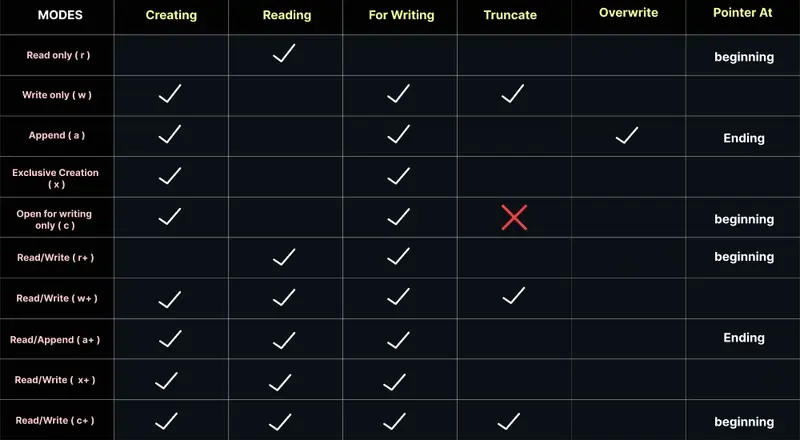
- Read only ( r ): This mode opens the file for reading only, and placing the pointer at the beginning of the file.
- Write only ( w ): Here, it opens the file for writing only and creates the file if the requested file path doesn’t exist. However, if the file already exists, it will truncate it to zero length.
- Append ( a ): This opens the file for writing. It detects if the file doesn’t exist, then creates it, but it positions the pointer at the end of the file, which means the data will be overwritten.
- Exclusive creation ( x ): This creates and opens a file exclusively for writing mode which means if the file already exists the “
fopen” process will fail and creates an error.
- Open for writing only ( c ): Here, the pointer is placed at the beginning of the file. But if it doesn’t exist, it will create the file. However, if the file already exists, it will not truncate the file.
- Read/Write ( r+ ): The “r+” mode opens the file for both reading and writing, also placing the pointer at the beginning of the file.
- Read/Write ( w+ ): This mode opens the file for both operations: reading and writing. It detects if the file doesn’t exist, then creates it. However, if it finds the file in the path, it will truncate it to zero length.
- Read/Append ( a+ ): Here, this mode will open the file for reading and writing. It detects if the file doesn’t exist, then creates it and places the pointer at the end of the file. It will not truncate the data inside the file.
- Read/Write ( x+ ): This creates the file if it doesn’t exist for reading and writing. However, if the file is already found, the operation will fail and creates an error.
- Read/Write ( c+ ): The ‘c+’ mode opens the file for reading and writing. If the file exists, it will not truncate the data inside but will place the pointer at the beginning. However, It detects the file’s existence; if it is not present, it will create the file in the requested path.
To summarize modes in the ‘fopen’ PHP callback function, check to the below table:
Let’s see a quick example for the “read only” mode:
<?php $fopen= fopen("codedtag.txt", "r"); ?>Anyway, let’s move into to below section to see more examples.
PHP fopen() Examples
In the following example, I will use the fclose callback to close the file stream, and this will occur once the fopen has completed its operation.
<?php

$my_file = "codedtag.txt";
$mode = "r";
$fopen = fopen($my_file, $mode);

if ($fopen) {
    echo "File opened successfully!";
    // Perform file operations here

    fclose($fopen); // Close the file when done
} else {
    echo "Error opening the file.";
}

?>
According to this example, I used the fopen function to open the file “codedtag.txt” using the “read-only” mode.
If the file is successfully opened, it will display the success message.
Once it completes its operation, the fclose callback will close the file stream.
Note: When calling the fopen function, you should use the fclose callback after completing your tasks on the file to end the file access.
But, if the file doesn’t exist, the program will produce a warning message like the below one:
Warning: fopen(codedtag.txt): Failed to open stream: No such file or directory in C:\xampp\htdocs\php\fopen.php on line 5
Error opening the file.
So, to prevent this warning, we need to use another PHP built-in function, which is file_exists, to check whether the ‘codedtag.txt’ file already exists or not. This can be achieved with an additional if statement in the code.
<?php

$my_file= "codedtag.txt";
$mode = "r";

if( file_exists( $my_file) ) {

  $fopen= fopen($my_file, $mode);

  if ($fopen) {
      echo "File opened successfully!";
      // Perform file operations here

      fclose($fopen); // Close the file when done
  } else {
      echo "Error opening the file.";
  }

}

?>
Actually, there is another mode can create the file if it doesn’t exists which is the “a+” flag, here is an example:
<?php fopen("codedtag.txt", "a+"); ?>By executing this example with the “a+” mode, the file will be created if it doesn’t exist, and it will not overwrite the existing file.
Let’s summarize it.
Wrapping Up
Through this exploration, we have explained various modes using the fopen function in PHP and understood how they work for reading, writing, and appending data to files. Let’s summarize it in a few points:
- The “
fopen” function is designed to access external files in PHP. - You should use “
fclose” when using"fopen"to end file access. - When using the
"fopen"function in PHP, you need to check whether the file already exists or not in some mode cases to avoid any errors.
Similar Reads
Variables in PHP are general elements used for data storage and other manipulations. Global variables belong to a particular category…
The PHP array_fill_keys function helps you to build an array where each key has the same value. What is the…
The whole world of PHP programming revolves around data, be it numbers, text, or more complicated structures. Each of these…
So, what is a function? Quite simply, a function in PHP is a set of instructions you write once, and…
PHP $_SERVER is a superglobal. It’s a predefined variable containing information about your server, client, and request environment. As a…
Abstract class in PHP appeared to provide a way to define a structure for related classes and don't allow direct…
PHP 8.4 released a new built-in function, array_all checks to check if all array values meet a condition. It gives…
Use strtoupper() function when you want to change all letters in a string to uppercase in PHP. It works with…
This guide shows how PHP array_keys finds all keys in an array and how you can filter them by a…
User input can be unpredictable and dangerous. A simple form submission might carry malicious code or invalid data and lead…