The breadcrumb in HTML shows a path through a site and marks the place of a page inside it. It links back to higher pages and lets a user move between sections without guesswork.
Here is an example of where you can place breadcrumbs in a single article page:
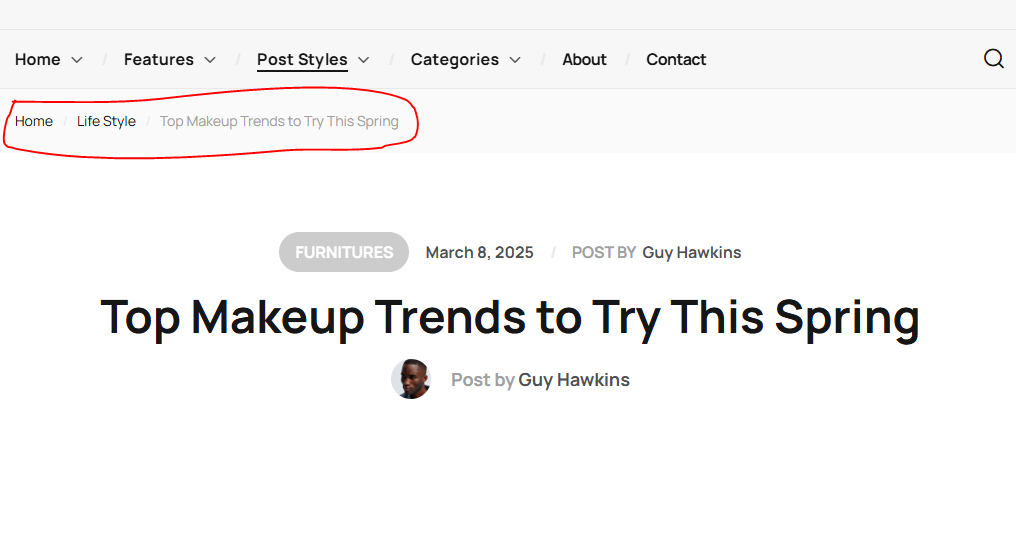
It also gives search engines a clear path of the site. This makes it a key part of good site structure for smart beginners who want to build easy paths in HTML.
What is an HTML Breadcrumb?
An HTML breadcrumb shows a user’s path inside a site and tells where the page stands in the site order. It also gives links back to higher pages and helps a user move around without guesswork.
Here is an example:
<nav aria-label="breadcrumb">
  <ol>
    <li><a href="/">Home</a></li>
    <li><a href="/shop">Shop</a></li>
    <li>Shirts</li>
  </ol>
</nav>
This shows the user stands in the Shirts page under Shop and can go back to Home or Shop. It also helps search engines read the site structure.

Types of Breadcrumb Navigation in HTML
Three main types exist in practice, and each one has a unique path style.
Location-based breadcrumb:
This type shows the page position in the site and fits sites with deep folder paths.
Home > Products > Phones > Model A
The user sees each folder step and can jump to any step.
Path-based breadcrumb:
This type shows each step the user took and fits a site that allows many ways to reach one page.
Home > Deals > Electronics > Model A
The user returns to any earlier step in that path.
Attribute-based breadcrumb:
This type shows filters or tags on a product page and fits shops with many product traits.
Home > Shoes > Size 10 > Black
The user drops any filter with one click.
Wrapping Up
You learned what an HTML breadcrumb is and how it works, and you also learned the main types with code samples for each one.
Here is a quick recap:
- A breadcrumb shows the path of a page inside a site.
- Location type shows folder steps.
- Path type shows the way the user came.
- Attribute type shows active filters or tags.
FAQs
What is HTML breadcrumb navigation?
<nav>element for structure<ol>or<ul>for the path<a>links for clickable steps
How do I create a simple HTML breadcrumb?
<nav aria-label="breadcrumb">
  <ol>
    <li><a href="index.html">Home</a></li>
    <li><a href="blog.html">Blog</a></li>
    <li>Article</li>
  </ol>
</nav>
Why is HTML breadcrumb important for SEO?
- Search engines understand site structure
- Users can move back with fewer clicks
- Breadcrumb links appear in search results
What are the types of breadcrumb navigation?
- Location-based: shows position in site hierarchy
- Attribute-based: shows categories or filters
- History-based: shows path user followed
Similar Reads
The track tag in HTML adds text tracks like subtitles and captions to media. It improves video access and helps…
The HTML head tag contains information and loads tools for the web page. What Is the <head> Tag in HTML?…
The abbr tag refers to an abbreviation in HTML. It helps you save space and improve accessibility. The screen readers…
Email templates are still the key tools for work and brands in HTML. A simple email can reach many people,…
The HTML input tag lets you add fields for user data in forms. You use this tag to collect text,…
The address tag in HTML shows contact details. The <address> tag helps show who owns the page or article. Understand…
The form autocomplete attribute in HTML helps users fill out forms faster because it shows them saved input for common…
This guide explains how to use the HTML meta http-equiv attribute, why it matters for SEO, and how browsers treat…
The <ins> tag in HTML shows text that the author added after the original content. This helps readers know what…
The <progress> tag in HTML shows task completion. It gives users visual feedback as the task runs. Understand the <progress>…