Table of Content
Mocha is a JavaScript test framework for Node.js. It runs tests in sequence and shows results. It works with any assertion library and supports asynchronous tests.
Benefits of Mocha Framework for JavaScript Testing
Mocha helps you run JavaScript tests with control and order. It works with any assertion library, so you can pick the one you want.
Let’s look at an example to understand it:
const assert = require('assert');

describe('Math tests', function() {
  it('adds numbers', function() {
    assert.strictEqual(2 + 3, 5);
  });
});
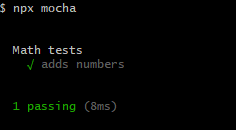
This test checks if 2 + 3 equals 5.
Here is the output in the terminal:
Install and Set Up the Mocha Framework to Test in JavaScript
Install Mocha with npm. Run this command in your project folder.
npm install --save-dev mochaAdd a test script package.json after installation in the same root of your code.
"scripts": {
  "test": "mocha"
}
Mocha with Assertion Libraries (Chai Example)
Create a file named test.js. Write a test inside it.
const assert = require('assert');

describe('Array', function() {
  it('returns -1 if value not found', function() {
    assert.strictEqual([1, 2, 3].indexOf(4), -1);
  });
});
This test checks if indexOf(4) gives -1 for an array with numbers 1, 2, 3. Here is an image that shows you the result:
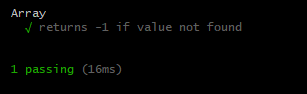
Run Test with the CLI of the Mocha Framework in JavaScript
Mocha works well with Chai. Chai gives different styles for writing assertions.
Install Chai with npm.
npm install chai --save-devHere’s how it works in practice.
const chai = require('chai');
const expect = chai.expect;

describe('Chai test', function() {
  it('checks type of value', function() {
    expect('hello').to.be.a('string');
  });
});
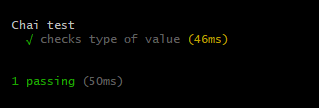
This test checks if 'hello' is a string.
Run tests with the Mocha CLI. Use the command below.
npx mochaThe command finds test files and runs them. It shows the results in your terminal.
Here is the result:
Organize Tests in Projects
Keep tests in a folder named test in your project. Mocha looks inside this folder by default. Place each test file inside it.
Use names that describe the test purpose.
Wrapping Up
You learned the role of Mocha and how to install it. Also, you understood how to write a test and how to run it.
Here is a quick recap:
- Mocha runs JavaScript tests with sequence and control.
- It works with assertion libraries like Chai.
- It runs tests from the CLI with
npx mocha. - It supports the test organization inside a
testfolder.
FAQs
What is Mocha JavaScript Test Framework?
How do I install Mocha JavaScript Test Framework?
npm install --save-dev mocha- Install globally:
npm install -g mocha - Install locally:
npm install --save-dev mocha
How do I write my first Mocha test?
const assert = require('assert');
describe('Array', function() {
  it('should return -1 when value is not present', function() {
    assert.equal([1,2,3].indexOf(4), -1);
  });
});
- Create test file:
test.js - Run test:
npx mocha
How to run Mocha tests from command line?
- Run all tests:
npx mocha - Run specific file:
npx mocha test/test.js
Similar Reads
You have to organize your JavaScript code structure. A clean layout helps you read and fix your code. Whether you…
The "do while" loop in JavaScript runs code once before checking the condition. Use it when the code must run…
Arrays often hold other arrays. This happens with API responses, form data, or nested objects. These layers add extra steps…
In this guide, you will learn how JavaScript functions work and why they matter. Each section shows what you need…
JavaScript gives you the Math.trunc() function to work with decimal numbers. You use it when you want to remove the…
JavaScript Symbol Type gives a way to make unique values. A Symbol never matches any other value and this helps…
If you are ready to take your first steps into the realm of web development, then there cannot be a…
The development of full-featured and interesting pages cannot be done without JavaScript which makes it possible to animate plain HTML…
Bitwise operators work with binary data at the bit level in JavaScript. They process numbers in binary form and return…
JavaScript syntax is what you will use when writing and reading javascript code, it is the foundation of using this…